Showing posts with label spring. Show all posts

Wednesday, May 23, 2018

dependency injection (DI) vs inversion of control (IoC) ?

Problem statement: what do you mean by dependency injection (DI) and inversion of control (IoC)?
  • IoC (Inversion of Control): giving control to the container to get instance of an object is called inversion of control, meaning instead i'm creating the object using new operator, let container do that for me.
  • DI (Dependency Injection): way of injecting (providing) properties to an object is called DI.
  • Types of Dependency Injection
  1. Constructor Injection
  2. Setter/Getter Injection - property in xml
  3. Interface Injection (spring does not support)

Friday, May 18, 2018

What do you mean by spring module?

Problem statement: what are the spring's modules have you used in you projects?


  1. Spring Core module [ Beans, Context ]
  2. Spring Web module [ MVC, Servlet ]
  3. Spring DAO module [ ORM ]
  4. Spring Intergrations [ JMS ]
  5. Spring AOP [ Aspect Oriented Programming ]

what do you mean by spring mvc architecture?

Problem statement : what is the architecture of your project if you use spring mvc pattern?


Step 1: First request will be received by DispatcherServlet
Step 2DispatcherServlet will take the help of HandlerMapping and get to know the Controller class name associated with the given request
Step 3: So request transfer to the Controller, and then controller will process the request by executing appropriate methods and returns ModelAndView object (contains Model data and View name) back to the DispatcherServlet
Step 4: Now DispatcherServlet send the model object to the ViewResolver to get the actual view page
Step 5: Finally DispatcherServlet will pass the Model object to the View page to display the result

Friday, May 4, 2018

Spring Boot Rest API Web Application !!

Problem statement: Implementation of Spring boot rest api web application

How to create Spring Boot Project for Rest API web service own implementation

Method-I: 
step-1: go to eclipse / sts ide menu bar
step-2: select File --> New --> Spring Starter Project
step-3: by default pom.xml will add required spring boot dependency
step-4: create your own controller class and enjoy.

Method-II:
step-1: go to eclipse / sts ide menu bar
step-2: select File --> New --> Maven Project
step-3: add the <spring-boot-starter-parent >
step-4: add <spring-boot-starter-web> dependency and enjoy


  • Required code implementations:

[1]- pom.xml:
<project xmlns="http...>

        <groupId>com.ishaan</groupId>
<artifactId>maven_projects</artifactId>
<version>0.0.1-SNAPSHOT</version>
<packaging>jar</packaging>
       
        <properties>
<project.build.sourceEncoding>UTF-8</project.build.sourceEncoding>
<java.version>1.8</java.version>
</properties>

        <parent>
<groupId>org.springframework.boot</groupId>
<artifactId>spring-boot-starter-parent</artifactId>
<version>1.5.1.RELEASE</version>
</parent>

<dependencies>
<!-- This is a web application -->
<!-- Adds Tomcat and Spring MVC, along others, jackson-databind included
transitively -->
<dependency>
<groupId>org.springframework.boot</groupId>
<artifactId>spring-boot-starter-web</artifactId>
</dependency>
<!-- Tomcat embedded container -->
<dependency>
<groupId>org.springframework.boot</groupId>
<artifactId>spring-boot-starter-tomcat</artifactId>
<scope>provided</scope>
</dependency>
<dependency>
<groupId>org.springframework.boot</groupId>
<artifactId>spring-boot-starter-test</artifactId>
<scope>test</scope>
</dependency>
<dependency>
<groupId>org.springframework.boot</groupId>
<artifactId>spring-boot-starter-data-jpa</artifactId>
</dependency>

<!-- https://mvnrepository.com/artifact/org.springframework.boot/spring-boot-starter-json -->
<dependency>
<groupId>org.springframework.boot</groupId>
<artifactId>spring-boot-starter-json</artifactId>
<version>2.0.3.RELEASE</version>

</dependency>
</dependencies>
<build>
<plugins>
<!-- Package as an executable jar/war -->
<plugin>
<groupId>org.springframework.boot</groupId>
<artifactId>spring-boot-maven-plugin</artifactId>
</plugin>
</plugins>
</build>

</project>

[2] - SpringBootWebApplication .java:


import org.springframework.boot.SpringApplication;

import org.springframework.boot.autoconfigure.SpringBootApplication;

//Create an Application class
@SpringBootApplication(scanBasePackages={"com.ishaan.springboot"})
// same as @Configuration @EnableAutoConfiguration @ComponentScan
public class SpringBootWebApplication {

public static void main(String[] args) {
SpringApplication.run(SpringBootWebApplication.class, args);
System.out.println("Hello Spring Boot !!");
}
}

// @SpringBootApplication  add
// @Configuration -tags the class as a source of bean definitions for the application context.

// @EnableAutoConfiguration tells Spring Boot to start adding beans based on classpath settings, //other beans, and various property settings.

[3] - WebServiceRestController .java:

import org.springframework.web.bind.annotation.RestController;
import org.springframework.web.bind.annotation.RequestMapping;
import org.springframework.web.bind.annotation.RequestMethod;

//Create a simple web application
@RestController
@RequestMapping("/api")
public class WebServiceRestController {

@RequestMapping(value = "/ping/", method = RequestMethod.GET)
public String ping() {
return "Ping success !!";
}
}

[4] - application.properties : (under src/main/resources)
# port number used for spring boot
server.port = 8090

[5] - application.yml: (under src/main/resources)                                        

        server:
            port: 8090
Note: Point [4] and point [5] are same thing, with different way of representation.

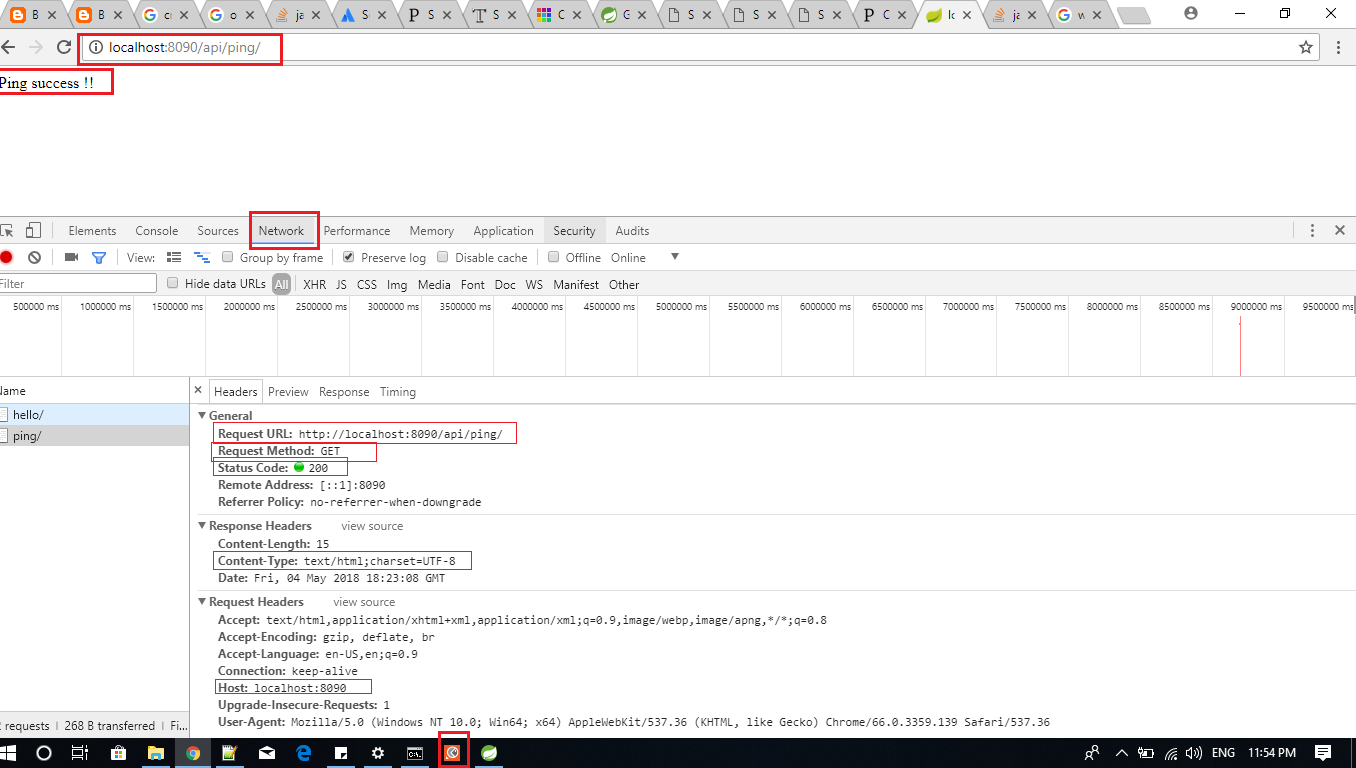
URL request to access resources: http://localhost:8090/api/ping/
Response from the TOMCAT server USING POSTMAN: Ping success !!


Blueprint for self-improvement

To learn faster: Make the process fun To understand yourself : Write To understand the world better : Read To build deeper connection : Lis...